


You can find outdated content on any part of your portal: pages, documents and even whole sites. Since many SharePoint sites are closely integrated with different company information services, or many contain personal or sensitive commercial data, outdated content must be treated with the utmost care.
What dangers lies in wait:
- Forgotten pages may occur as a result of test implementations and other experiments and contain unsafe content.
- Forgotten documents may contain confidential data and can be found by internal or external search services. This could result in damage to reputation of the company.
- Unused sites can indicate poor adaptation to SharePoint technologies, and therefore insufficient efficiency concerning its implementation or adoption.
Portal analysis with HarePoint Analytics for SharePoint allows you to quickly identify outdated content.
Forgotten pages
The “Unused pages” report shows the list of all pages which haven’t been visited since a specified date. The report also indicate the author of the page and the last user to visit the page:
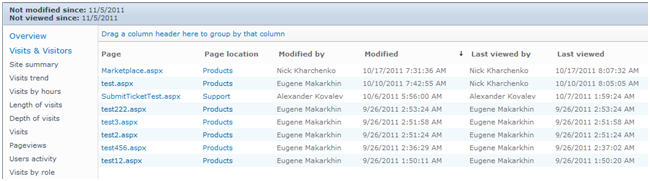
A large list of pages with the names containing “test” or “temp” in the report may indicate a lack of adequate regulation in the development department, or problems with execution of the desire functionality on the given site.
Forgotten documents
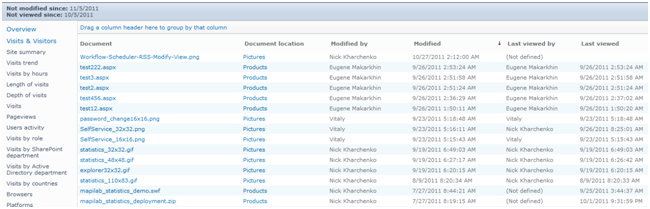
The “Unused documents” report shows the list of unused documents on a site or site collection.
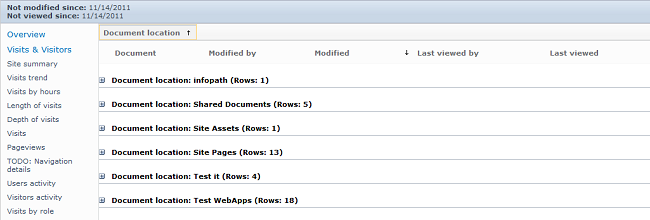
Grouping by document location will help get an overall view of what is happening at big nodes:
Using filter “(Not defined)” by field “Last viewed by” will identify document libraries, the content of which was never used by anybody:
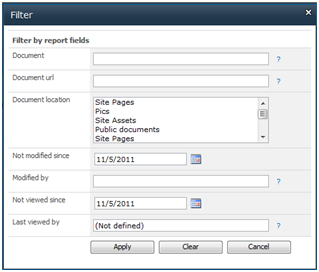
It is possible that these documents are located in the archive. Another possibility is that employees don’t know that these documents are available on the SharePoint portal.
Forgotten sites
The “Site summary” report shows the list of sites in the collection and their traffic for the chosen period.
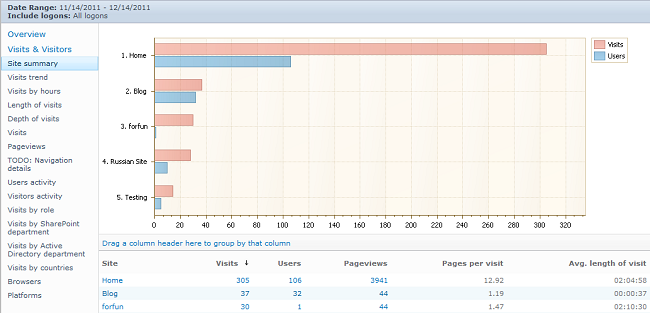
The presence of sites with zero traffic may indicate low adoption of SharePoint technologies among employees and also among web sites developers. Either the site authors were not able to complete the site for some reason, or they were unable to present the site to the intended audience. In any case, the results of this filter indicate projects on which time and money was spent and which showed zero effectiveness, and such cases do require analysis.
Conclusions
HarePoint SharePoint Analytics reports can help you to easily identify the problems in your organization, and even a quick analysis of outdated content can reduce the potential for leaks and threats, reveal the effectiveness of projects and assess the level of adoption of SharePoint technologies in different departments of the organization.