Largest extension package for SharePoint workflow platform
Our package expands the set of built-in SharePoint workflow actions and conditions about seven times. But the capabilities that you will have at your fingertips are incomparably greater. Whatever you want to do in your workflows – convert or create new documents, create users in Active Directory or sites on SharePoint, post to Facebook, read RSS newsfeeds, run PowerShell code or query web services – now you can do it easily.
Small investments, high ROI
Over the years, we have helped make very different workflows for many clients. This product has been on the market more than 3 years and is used in about a thousand companies around the world. It is a large, tested, well-designed and complete framework for workflow development. Sophisticated actions that would otherwise take several weeks to research and perfect on your own can be added to workflows with few clicks. Consider the cost of a SharePoint developer’s working day and that weeks of work will be saved – that is a very good deal. Here are some example workflows from various categories:
Product highlights
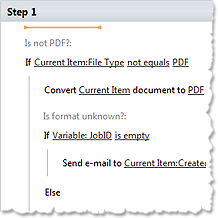
You may find many product features extremely useful. The following is a short list for your attention. You can print documents from workflows. Convert InfoPath forms to PDF. Work with SQL and XML. Send instant messages and tweets. Send emails with attached documents or files. Edit Excel and Word documents. Manage sites and permissions. Do nearly anything with lists. Manage users and groups in Active Directory. Use CAML and Regexp. Convert and resize images. Receive and parse e-mails. Upload documents to FTP or OneDrive. And that’s far from all.
 Create PDF documents from the filled InfoPath form Create PDF documents from the filled InfoPath form
Read more about printing from SharePoint worfklow
Free download, free activities and licensing
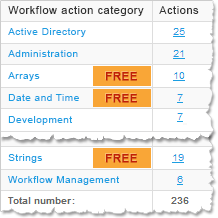
We offer you a free, fully-functional 30-day trial. After the trial period you may continue to use over 30 workflow actions of the free set. If you need only a few activities from among the paid set, we offer a special, limited license – priced at about the cost of a day of work by a SharePoint developer. And even with the limited license, you get full support and software updates for one year. Check the links below to learn more about licensing, get a quote or download trial version.
|
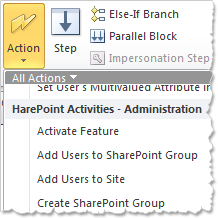
Same workflow tools, more power
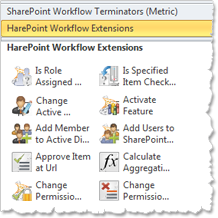
Just deploy the product, and your users immediately get new workflow actions in SharePoint Designer. Don’t waste time on learning a new platform or new
tools. Start making high-power workflows right now. What is the learning curve for use? Find the right action in the categorized list of SharePoint Designer;
the parameters are intuitive. If you are not completely sure about something, read the half-page description. It is a matter of minutes, not hours.
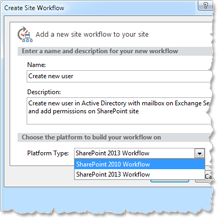
Works with SharePoint SE, 2019, 2016, 2013, 2010 on premise
This product is designed for the SharePoint 2010 workflow platform and it works with all editions of SharePoint 2010, both on SharePoint Server and Foundation. The SharePoint 2010 workflow platform is also available in SharePoint SE, 2019, 2016, 2013, and in fact, only this platform is available in the out-of-the box installation of SharePoint on premise. With HarePoint Workflow Extensions, you can make the same workflows for on-premise deployments of SharePoint SE, 2019, 2016, 2013 and 2010. The product is fully compatible with Microsoft SharePoint Designer.
View system requirements of the product
What are users saying
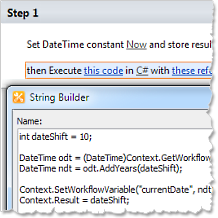
Better control, rapid development, lower costs
Sometimes it happens. You need custom code to do something very special. In this case you may start to code a custom workflow action or even program a workflow in Visual Studio. If you are not familiar with this subject even a simple thing can take a lot of time. The same is true of SharePoint development. Modification or support of such solutions can be complicated and expensive. We offer you an activity which executes C# or VB. Net scripts and an activity to run PowerShell scripts. In this case, there is no need to re-deploy a solution when changes occur – just edit the script code in SharePoint Designer. Focus on your business tasks, not on coding.
Read more about C# scripts, custom actions and Visual Studio workflows
See sample of PowerShell usage to create Exchange mailboxes from workflow
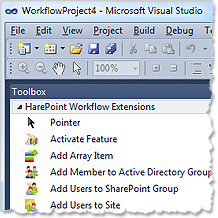
Where you can use the product
You can use product’s workflow actions and conditions in list workflows, site workflows and reusable workflows. Likewise in any declarative workflow or any SharePoint Designer workflow. You can use the product’s workflow activities in Visual Studio workflows, as well as built-in workflow activities. You can even draw workflow diagrams and design workflows in Microsoft Visio.
See screenshots of product usage in Visual Studio and Visio
See the video with workflow authoring in Microsoft Visio
|